
If you manage a Google Ads or GA4 account, Google has probably already told you about Google Tag Gateway. The push is hard to miss: help-center pages now call an upgraded Google tag “a vital action every marketer should take”, advertisers are reporting new Search campaigns flagged “Eligible (Limited)” when the Google tag is missing, and since February 2026 the Data Manager diagnostics hub grades the health of your data connections inside the account itself.
The push is real. The explanations circulating around it are often not. In this post we set out what Tag Gateway actually does, what the measured results look like once you separate Google’s marketing figures from independent tests, and how to decide whether your site should implement it.
What is Google Tag Gateway?
Google tag gateway for advertisers, GTG for short, changes where your Google tags are served from. In a standard setup, your visitor’s browser fetches gtag.js or Tag Manager from googletagmanager.com and sends measurement data to Google’s domains. With Tag Gateway, both happen through a reserved path on your own domain, for example yourdomain.com/metrics. Your CDN or load balancer then forwards those requests to a dedicated Google endpoint behind the scenes.
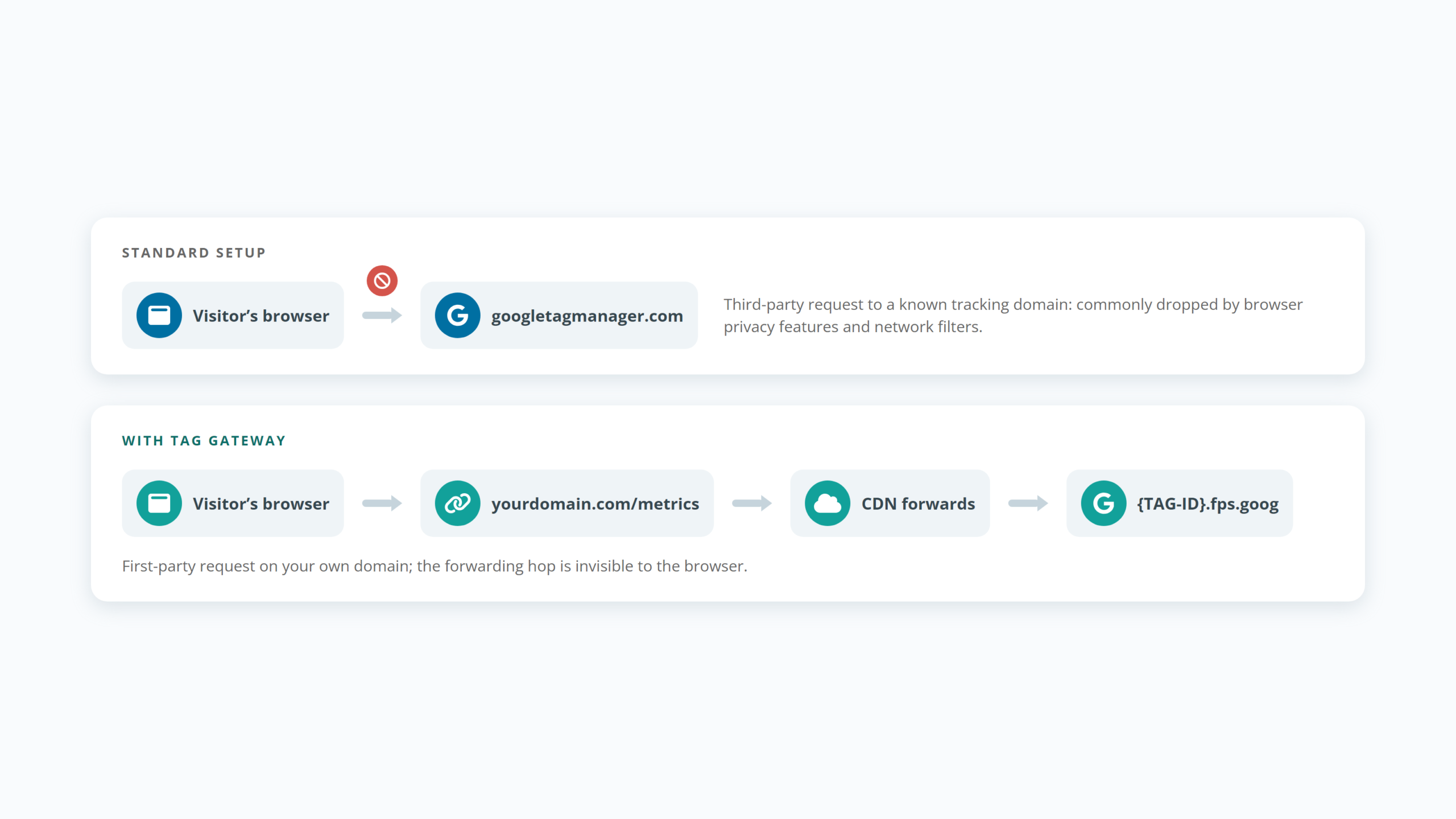
To the browser, your analytics and conversion tracking are now first-party traffic on the same domain as the page itself, not calls to a known third-party tracking domain.
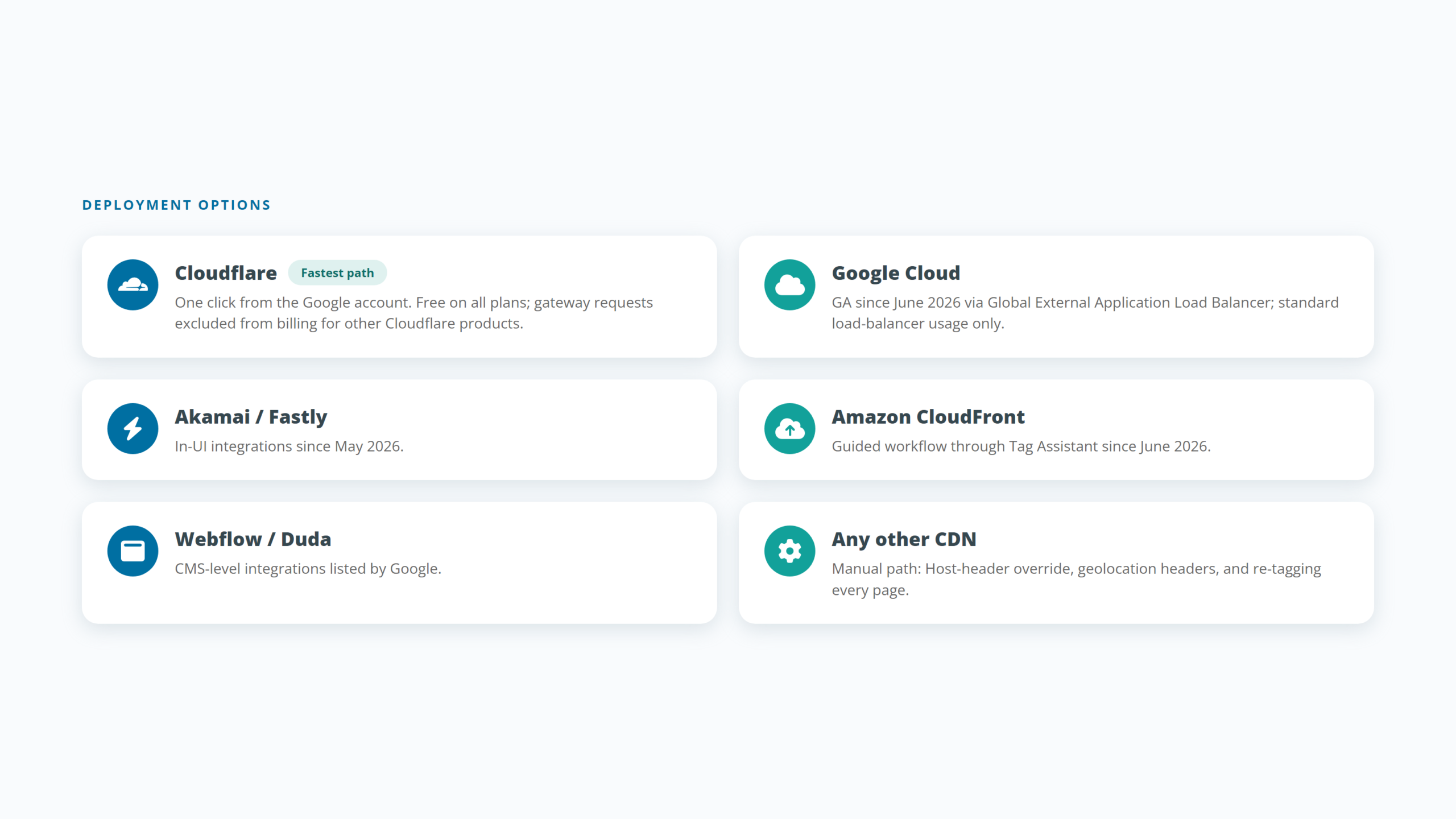
The product is not brand new. It launched in beta as “first-party mode” in 2024, was renamed and made generally available in May 2025 with Cloudflare as launch partner, and through 2026 gained one-click deployments on Google Cloud, Akamai, Fastly, and Amazon CloudFront, plus a manual route for any CDN that can forward requests. What changed recently is how firmly Google recommends it.
The problem it solves
A meaningful share of Google tag requests never arrive. Browser tracking prevention, privacy extensions, and DNS-level filters commonly block requests to recognized tracking domains, which means sessions, conversions, and remarketing signals silently disappear before Google ever sees them. Your campaigns still run; the reporting and the bidding algorithms simply work from incomplete data.
Serving tags through your own domain removes the most common blocking trigger, the third-party domain itself. Requests that were dropped for that reason alone come back. That, in one sentence, is the entire value proposition.
What the numbers actually say
Google publishes three headline figures, and they measure three different things:
| Figure | What it measures | Basis |
|---|---|---|
| 11% uplift in signals | Tag script loads | Google data, April 2025, gateway vs non-gateway tags |
| 14% average conversions uplift | Reported conversions | Google internal data, finance vertical, second half of 2024 vs first half of 2025 |
| Up to 7% lower CPA | Cost per acquisition |
Advertisers Enhanced Conversions plus Tag Gateway vs Enhanced Conversions alone, Mar 2025 to Feb 2026 |
Independent tests are more modest and more consistent: a hands-on test by Loves Data measured almost 7% more reported users, Tracking Chef measured roughly 8% more sessions in a parallel setup, and aggregated real-world figures from implementation specialists cluster around 4 to 6%.
Our reading: expect low-to-high single digits of recovered signal, with the exact number depending on your audience’s browser mix and ad-blocker usage. That may sound small. It is not. The recovered conversions flow into Smart Bidding, so the effect compounds: better data, better optimization, better spend efficiency.
What Tag Gateway does not do
This is where most published explainers overreach, so let us be precise.
It does not bypass ad blockers. Most blockers match request patterns such as /g/collect regardless of which domain serves them. Independent testing confirms almost all popular blockers still recognize gateway traffic, and Google itself never promises otherwise.
It does not extend cookie lifetime. Cookies are still set by JavaScript in the browser, so Safari’s seven-day cap on script-written cookies applies exactly as before. Extending cookie lifetime requires server-side tagging, where cookies are set via HTTP headers.
It does not change your privacy or consent obligations. The same data flows to the same recipient; only the route changes. Consent requirements, consent mode, and your legal basis for processing remain exactly what they were.
It only covers Google tags. GA4, Google Ads, and Floodlight benefit. Meta, TikTok, Snap, and every other pixel still load exactly as they did before.
Tag Gateway vs server-side tagging
The two are regularly confused, and they should not be. Tag Gateway is routing: it changes where scripts and hits travel, and nothing about what is collected. Server-side tagging (sGTM) is infrastructure you control: it can filter and enrich data, feed non-Google platforms through CAPIs, and set long-lived cookies from the server.
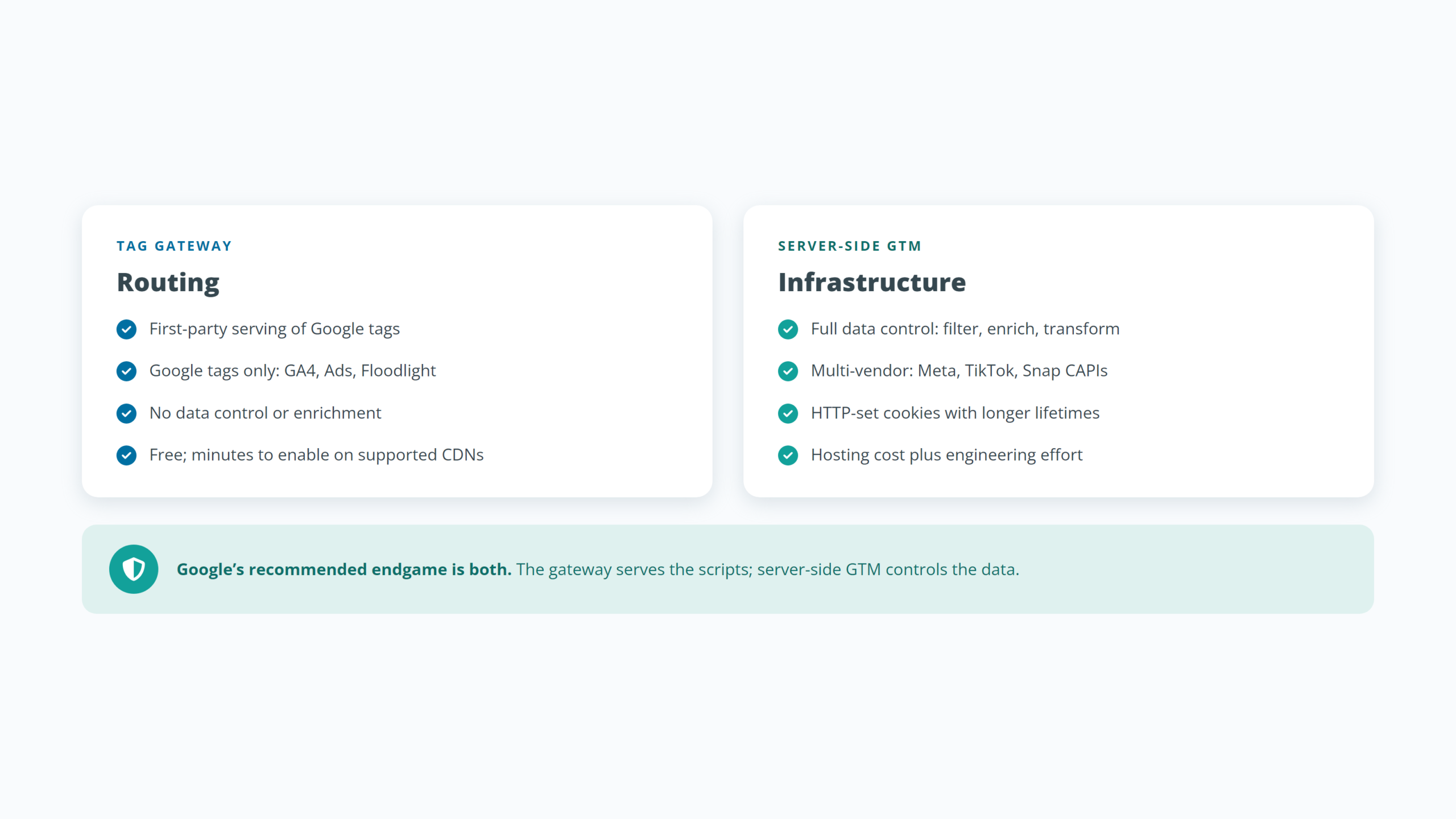
Google’s own documentation is unambiguous here: the recommended, most durable setup is Tag Gateway serving the scripts plus a server-side container managing the data. For a site with no server-side setup and a Google-heavy stack, Tag Gateway is the free quick win. For a site that already runs a well-configured server-side container with a custom loading domain, Tag Gateway adds little and can be redundant. For everyone in between, the honest answer is a short assessment, not a slogan.
Implementation: easy, but with real traps
On Cloudflare, activation is genuinely one click from your Google account, free on every Cloudflare plan, with gateway requests excluded from Cloudflare billing. Google Cloud, Akamai, Fastly, and CloudFront have their own supported paths, and a manual route exists for other CDNs.
The traps are less advertised:
- Consent mode: Google states plainly that if you use consent mode, automated script setup must be turned off. Configured naively, the CDN-injected script can fire before your consent platform sets its defaults. This alone justifies having the setup reviewed.
- Manual setups fail silently: if the on-page tags are not repointed to the new path, browsers simply keep loading tags directly from Google, and nothing looks broken.
- Geolocation headers: manual setups must forward country and region headers, or your geographic reporting degrades.
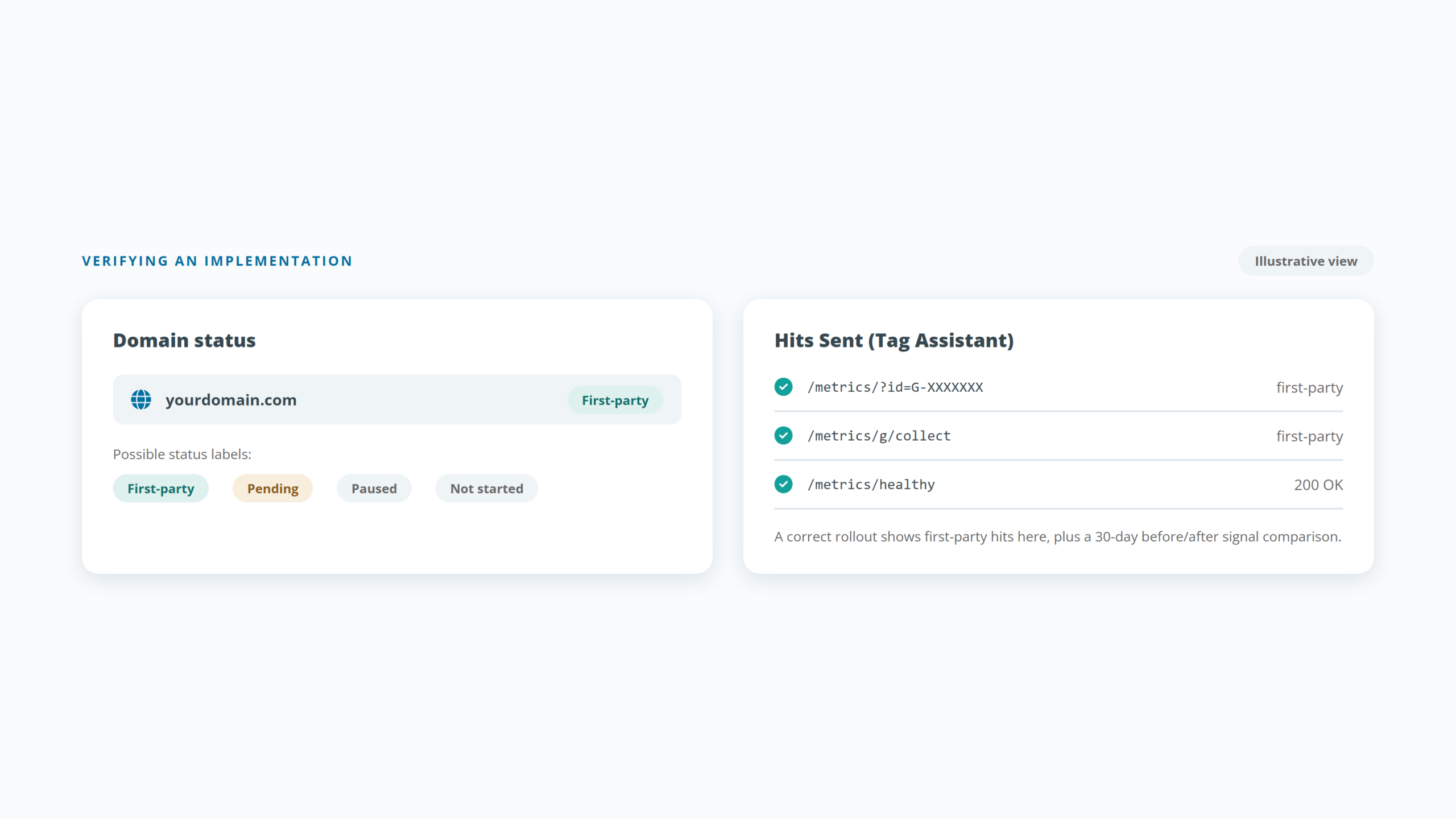
- Verification: a correct rollout shows “First-party” domain status in your Google tag settings and first-party hits in Tag Assistant, and should be confirmed with a before/after signal comparison, not assumed.
Who should implement it
Good fit: sites on a supported CDN (especially Cloudflare), a meaningful Google Ads investment, no existing server-side infrastructure, and audiences where ad-blocker or Safari share is significant.
Weak fit: sites already running well-configured server-side tagging with a custom loader, stacks where Google tags are a minor component, and very small sites where single-digit signal recovery will not change any decision.
The bottom line
Tag Gateway is a low-cost, low-risk upgrade with a real but modest measured benefit, and it is quickly becoming Google’s default expectation for a healthy tagging setup. It deserves neither the hype nor the cynicism it gets. It deserves twenty minutes of qualified setup and a proper before/after check.
Daam Al-Arabia is implementing Google Tag Gateway for existing clients at no cost, including CDN compatibility review, consent-safe configuration, and verified before/after measurement. If you would like the same assessment for your setup, contact us.
Frequently asked questions
Is Google Tag Gateway mandatory?
No. Google recommends it and surfaces it prominently in account diagnostics, but nothing in Google’s documentation makes it required, and no feature is withdrawn if you skip it.
Does Google Tag Gateway cost anything?
Google charges no fee. On Cloudflare the integration is free on all plans and gateway traffic is excluded from billing for other Cloudflare products. On Google Cloud you pay standard load-balancer usage.
Will it break my current tracking?
On the supported one-click paths, no retagging is needed and the change can be paused centrally. The main configuration risk involves consent mode, which is why we review consent setup as part of every implementation.
Does it replace server-side tagging?
No. It complements it. Google’s recommended architecture uses both: the gateway for serving, a server-side container for data control. If you already run server-side tagging with a custom loading domain, you may not need Tag Gateway at all.
How much more data will I see?
Independent tests measure roughly 4 to 8% more captured signal; Google’s own figures are higher but come from observational comparisons. The honest answer for any specific site depends on its traffic mix, which is what a before/after comparison establishes.
Does it work for visitors in Europe?
Partly. Google documents that for EEA users, GA4 measurement data bypasses the gateway and goes directly to Google’s regional endpoints, while Google Ads conversion hits still route through the gateway. Sites with heavy EEA traffic will see less GA4-side effect.
Send Us A Message
Quick Contact
Quick Contact
Trusted by some of the biggest companies in the Kingdom